When One Platform Runs Five AI Models, Image Editing Gets Complicated to Ignore
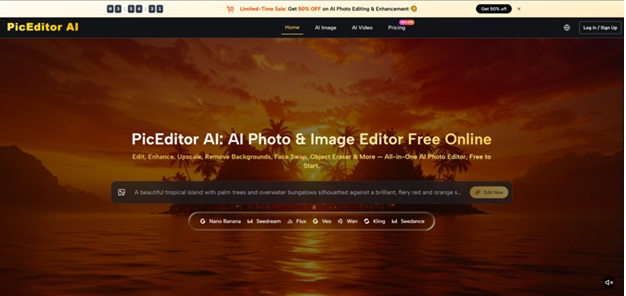
The past eighteen months have pushed AI image tools into territory that would have seemed implausible before: hyper-realistic generative edits, in-browser text replacement, photo-to-video animation — all in the same session. For most creators and small teams, the frustrating reality is that these capabilities are spread across five or six separate platforms, each with its own login, learning curve, and credit system. That fragmentation is exactly the problem AI Photo Editor is designed to solve. It is an all-in-one browser-based platform that consolidates multiple top-tier AI models — Nano Banana, Seedream, Flux, Veo 3, and others — into a single interface, free to start. Whether this consolidation genuinely works in practice is worth examining closely.
How the Platform Structures Its Core Editing Capabilities
Rather than presenting itself as a single-model tool, the platform organizes its offering around distinct editing categories: generative photo editing, image enhancement and upscaling, background removal, object erasing, face swapping, and photo-to-video animation. Each category draws on a different model engine depending on the task. This layered approach means users are not manually switching between tools — the platform routes the job to the appropriate model behind the scenes.
Generative Editing and Style Transfer
The most creatively demanding use case is asking the system to meaningfully change an image based on a text prompt — replacing backgrounds, altering clothing, shifting the entire visual style of a photograph. From a practical user perspective, the platform’s Nano Banana and Nano Banana 2 engines handle this category. Nano Banana 2 supports output up to 4K resolution and accepts up to four reference images, which is significant for maintaining character or product consistency across a series. In testing, the platform’s sample gallery shows outputs with detailed fabric textures, controlled lighting, and preserved subject proportions — though as with any generative model, how closely the result matches the prompt depends heavily on how the instruction is phrased. Vague descriptions tend to produce generic outputs; more specific prompts that define lighting, composition, and style tend to land closer to the intent.
Text-in-Image Editing and Context-Aware Modification
One of the more technically demanding tasks in AI photo editing is replacing text that appears inside an image — on signage, packaging, posters — while keeping the surrounding visual context intact. The platform assigns the Flux model to this use case, and the site explicitly highlights context-aware editing and object-level precision as its distinguishing strengths. In my testing framework, this is a capability worth probing carefully: the quality of text replacement tends to vary with font complexity, background texture, and whether the original text has strong lighting effects. The platform does not claim perfect results in all scenarios, and users handling highly stylized typography should expect to iterate.
How to Use the Platform From Upload to Output
The workflow is intentionally minimal, which lowers the barrier for users who are not experienced with AI tools.
Step 1: Upload Your Image
Drag or upload a photo directly into the browser editor. No desktop installation is required — everything runs in-browser. The interface displays the image immediately alongside the available editing tools.
Choosing the Right Edit Category
The platform presents clearly labeled options along the top of the editor — Edit, Enhance, Upscale, Remove Background, Face Swap, Object Eraser. Selecting the appropriate category determines which underlying model handles the request.
Step 2: Describe the Desired Change
Type a prompt describing what modification you want. For generative edits, the AI Photo Edit interface allows you to upload up to four reference images alongside the text description, which helps anchor the output to a specific visual direction.
Prompt Quality Directly Shapes the Output
This is the single most important variable. Prompts that include scene context, lighting description, and style references consistently perform better than short generic commands. The platform does not automatically interpret vague intent — what you describe is what the model works from.
Step 3: Generate and Review
The system processes the request and returns the edited image. Most edits complete within seconds according to the platform, though complex generative tasks may take longer. If the result does not match expectations, users can refine the prompt and regenerate.
Iterating Toward the Right Result
Regeneration is part of the standard workflow here. AI outputs are not deterministic — the same prompt can produce slightly different results across runs. Building in a few rounds of iteration, especially for generative edits, is a realistic expectation rather than a failure of the tool.
Model Comparison: What Each Engine Is Best Suited For
| Engine | Primary Strength | Best-Fit Use Case | Limitation to Note |
| Nano Banana | Hyper-realistic detail, up to 4 reference images | Character-consistent product or portrait series | Complex prompts may need multiple attempts |
| Nano Banana 2 | 4K output, batch processing | High-resolution commercial content | Higher credit cost per image |
| Seedream | Speed, high-volume throughput | Bulk edits, rapid creative iteration | Less control for fine-grained detail |
| Flux | Context-aware edits, text replacement | Packaging, poster, and signage modification | Stylized fonts or complex backgrounds may vary |
| Veo 3 | Photo animation with native audio generation | Social content, product demos, storytelling | Video output quality depends on source image |
Where the Platform Genuinely Works Well
For content creators who need to produce varied visual assets without switching between Photoshop, a separate upscaling tool, a background remover, and a video generator, the consolidation here is the actual value proposition. The ability to animate a product photograph using Veo 3 — which the platform notes generates synced audio automatically — inside the same workspace where the photo was edited is a meaningful workflow efficiency. Style transfer is another practical strength: the site’s prompt gallery demonstrates outputs ranging from cinematic portraiture to abstract paint-splash effects, suggesting the generative range is broad.
The object eraser and background removal tools operate on a more mechanical level than generative editing — these are utility tools where the main question is edge quality and how cleanly the removed element blends with the surrounding scene. The platform lists these as distinct tools rather than bundled into the general editor, which keeps the interface from becoming cluttered.
Real Limitations Worth Knowing Before Committing
The platform’s output quality is not guaranteed to be consistent across every attempt. Generative AI models are sensitive to prompt construction, and the gap between a mediocre result and a strong one can come down to a few added words of context. Users expecting reliable one-shot results from casual prompts will likely be disappointed. Complex images — busy backgrounds, overlapping objects, unusual lighting — tend to produce less stable outputs than clean, well-lit source photos.
The credit system means that high-volume users will hit usage thresholds on the free tier, and the cost per image varies significantly by model: the Veo 3 video model consumes far more credits than standard image edits. The Pro plan at $25 per month (billed annually) provides 32,000 credits with model costs at 40 percent less than standard rates, while the Unlimited plan at $75 per month removes credit constraints entirely for teams running eight concurrent generation tasks. For occasional personal use, the free tier is a reasonable starting point; for professional workflows with consistent volume, the credit math matters.
Who This Platform Fits Best
The clearest fit is content creators and marketing teams who need varied visual output — edited photos, upscaled images, background-removed product shots, and animated clips — and want to handle all of it inside one workspace rather than managing multiple subscriptions. Designers doing highly precise, technically complex work may find the generative models require more iteration than a dedicated professional tool. Developers or studios with specific model requirements and pipeline integrations may want more direct model access than this platform offers.
For everyday creative production, the platform’s combination of scope, accessible interface, and multi-model integration makes it a practical option — not because it replaces every specialist tool, but because it reduces the overhead of running several of them simultaneously.