
When Still Images Need a Sense of Time
For many creators, the hardest part of visual storytelling is not making something beautiful. It is making something feel alive. A strong photograph can capture detail, mood, and composition, yet it often stops just short of the emotional effect people now expect from modern media. In that gap between a still frame and a moving scene, Image to Video AI becomes interesting. It offers a way to turn a static image into short-form motion content without requiring a full editing workflow, a complicated animation process, or a traditional video production setup.
That matters because the pressure around visual communication has changed. Social platforms, product pages, event recaps, and educational clips all reward motion. A still image may be clear, but movement adds pacing, emphasis, and atmosphere. In my observation, this is why image-to-video tools are no longer treated as novelty utilities. They are becoming a practical bridge between image creation and video distribution.
Why Motion Changes The Value Of An Image
A still image is good at freezing a moment. A short video is better at guiding attention. That difference sounds small, but it changes how people interpret content. Motion can suggest where to look first, what matters most, and how a subject should feel. A pan, zoom, or subtle animated shift can make one image feel more cinematic, more personal, or more commercial depending on the context.
Movement Adds Direction To Visual Attention
When people look at a photo, they choose their own path across the frame. When they watch a video, that path is shaped for them. This is useful for product showcases, portraits, old photos, travel images, and social content because the creator gains more control over emphasis. A static composition can already be strong, but a moving version can guide the eye toward expression, texture, or depth.
Short Videos Travel Better Across Platforms
Another reason this category matters is distribution. Many publishing environments now privilege motion, even when the original content starts as a photo. A single image can work as a post, but a short animated version can fit reels, shorts, story formats, and lightweight ad creative. In practical terms, that means one source asset can be extended into more formats.
Emotion Often Arrives Through Small Changes
The most effective motion is not always dramatic. Sometimes a slight push-in, a gentle shift in perspective, or a restrained visual transition creates more emotional weight than a loud effect. In my testing of tools in this category, the best results often come from modest direction rather than overdescribed spectacle.
How The Platform Is Structured In Practice
What makes this platform notable is not only that it can animate photos, but that it organizes the task in a very direct web-based workflow. The official page presents image-based video generation as something accessible to non-editors. That framing matters because it lowers the mental barrier. You are not entering a professional animation suite. You are entering a focused generation environment.
The Interface Centers On A Few Core Inputs
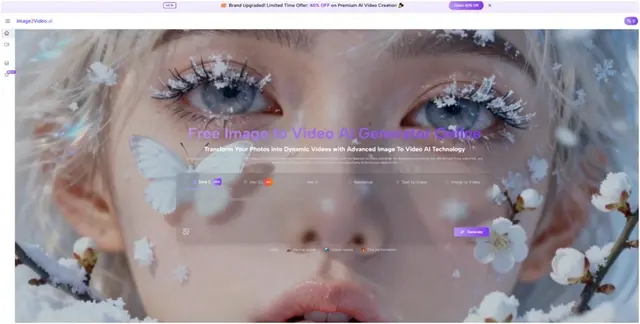
The generation page is built around a prompt field, image-based generation mode, aspect ratio choices, video length, resolution, frame rate, seed, visibility settings, and credits. That tells you a lot about how the product thinks. It is designed to keep the user close to the result rather than buried inside an editing timeline.
Prompt As The Main Creative Instruction
The prompt is where intent becomes motion. Instead of keyframing every action manually, the user describes what should happen. This does not remove creative judgment. It shifts that judgment into language. The better the prompt reflects subject, movement, camera feel, and mood, the better the generated clip is likely to align with the idea.
Parameters Shape Output More Than Users Expect
Aspect ratio, duration, resolution, and frame rate sound technical, but they are actually editorial choices. A vertical ratio suggests mobile distribution. A horizontal frame may suit product presentation or a more cinematic look. A short duration encourages concise movement. Higher resolution can make the output more usable in polished contexts. These are small controls, yet they strongly influence the final impression.
The Product Sits Inside A Broader Generation Ecosystem
One useful detail is that the platform is not framed as a one-off effect page. It sits alongside text-to-video, AI video generation, image generation, and themed templates. That signals a broader positioning: not just one gimmick, but a flexible visual generation environment. In my view, this matters because users increasingly want to work across adjacent modes without changing tools every time.
What Official Use Actually Looks Like
The official process is notably short. It does not pretend to be a full studio pipeline. It asks the user to upload an image, enter a text description, wait while the request is processed, and then review or share the finished result. That simplicity is one of the strongest parts of the product design.
Step One Select And Upload The Image
The first step is choosing the source image and uploading it. The platform supports common formats such as JPEG and PNG. This sounds basic, but it is important because it keeps the entry point close to how people already store and use images.
Step Two Describe The Intended Motion
The second step is entering a natural-language description. This is where creative control shifts from editing gestures to written direction. In practice, the prompt should not just describe the subject. It should describe the kind of motion, the mood, and the pacing you want.
Step Three Wait For Processing
The official flow notes that processing takes place after submission, with the platform indicating that the request is being handled. That waiting period is part of the tradeoff of AI generation. You save manual labor, but you exchange it for model inference time.
Step Four Review Download Or Share
Once the status is completed, the output is ready for download or sharing. This final step is simple, but it reveals the product’s goal clearly. The endpoint is not a complex project file. It is a deliverable clip.
Where The Tool Feels Most Useful
The most convincing case for this kind of product is not abstract innovation. It is practical reuse of visual assets. Many people already have images. They just do not have the time or skill to build motion graphics from them.
Marketing Teams Can Extend Existing Assets
A product team may already have clean still photography. Converting those images into short video clips can make a landing page, ad set, or social post feel more current without requiring a reshoot. In that sense, the value is not replacing creative production. It is extending it.
Creators Can Test Visual Ideas Faster
For creators, speed matters as much as quality. A still image can be repurposed into multiple short outputs with different motion ideas, aspect ratios, or moods. That makes the tool useful not only for publishing but also for concept testing.
Personal And Memory Content Gains Emotional Lift
Old photos, event stills, and portrait-based content benefit from motion because people often want emotional atmosphere more than technical complexity. A subtle animated clip can feel more vivid than a static gallery without becoming overly produced.
What Sets It Apart From Simpler Slideshow Logic
Some tools in this space feel like little more than automated transitions between stills. That can be useful, but it is limited. What makes a stronger tool is the sense that the image is being interpreted rather than merely rearranged.
| Comparison Area | Simpler Slideshow Tools | This Platform’s Approach |
| Primary Input | Mostly image order | Image plus natural-language prompt |
| Creative Control | Basic transitions | Motion direction plus visual settings |
| Output Feel | Presentation-like | Closer to short-form generated video |
| Format Options | Often fixed | Multiple aspect ratios and resolutions |
| Workflow Goal | Assemble images | Turn images into motion-driven clips |
The table matters because it clarifies that the product is not just about playing images back in sequence. It is about generating a motion interpretation.
Why Templates And Adjacent Modes Matter
Another useful part of the platform is that it does not stop at one neutral generator page. It also presents themed effects and related tools. That may look like marketing segmentation, and in part it is, but it also reflects real user behavior. People often arrive with a specific outcome in mind rather than a general technical question.
Specialized Entry Points Reduce Friction
A person searching for old-photo animation, a dynamic social clip, or another recognizable effect usually wants a direct path. Specialized pages reduce the distance between intent and action.
Broader Tool Context Increases Reuse
Because the platform also includes other generation modes, the same user can move between image creation and video creation without fully resetting their workflow. In my view, that continuity is increasingly important in AI creative tools. Users rarely want isolated utilities. They want a connected environment.
The Limits Are Part Of The Honest Story
No tool like this should be discussed as if it removes uncertainty. It does not. Results still depend on the source image, the wording of the prompt, the chosen settings, and the behavior of the underlying model.
Good Inputs Usually Lead To Better Outputs
A cluttered or ambiguous image gives the system more room to misread intent. Clean composition tends to help. The same is true of prompts. If the motion description is vague, the output may feel generic.
One Generation Is Not Always The Final One
In my experience, the first result is often a directional draft rather than a perfect finish. A second or third attempt may be necessary to get the motion feeling right. That is normal for AI generation, and it should be treated as part of the workflow rather than a failure.
Credits Encourage Selective Experimentation
Because the platform uses credits, users are likely to think more carefully about what they generate. That can be a limitation, but it can also be healthy. It encourages more deliberate testing instead of endless random output.
Cost Shapes Creative Behavior
When generation has a visible cost, people tend to refine prompts before submitting. That often improves quality. The process becomes less about accidental volume and more about intentional iteration.
Why This Product Category Keeps Expanding
Image-based video generation sits at a useful intersection. It serves people who already understand images, but who need movement to meet modern expectations. It is neither full filmmaking nor simple editing. It occupies the middle.
Later in a workflow, a creator may still want stronger control, sound design, or post-production polish. But for the first conversion from stillness to motion, Photo to Video captures an increasingly important role. It reduces the distance between a finished image and a publishable clip.
What This Means For Everyday Creative Work
The larger lesson is not that every photo should become a video. It is that more visual work now benefits from motion as a lightweight extension. This changes how people think about source materials. A still image is no longer only a final asset. It can also be the starting frame of something dynamic.
Images Become More Reusable Assets
When one image can support static publishing and short-form motion output, its production value rises. The original photo carries more downstream utility.
The Workflow Becomes More Flexible
Instead of deciding between image-first and video-first from the start, creators can move in stages. They can begin with a strong still, then add motion later if the context calls for it.
The Most Useful Promise Is Modest
The real promise of tools like this is not magical automation. It is practical acceleration. They help creators, marketers, and everyday users turn an already useful asset into a more adaptable one. That is a quieter promise than the industry sometimes makes, but it is also the one that feels most believable.


